Overview

  • Input Your Paragraph
  • Customize Your Output
  • Rewrite Your Paragraph
  • Review the Results
  • Copy or Download the New Paragraph
  • Tips for Getting the Best Results from the Paragraph Rewriter
AI Essay Writing Tools

Learn to Use MyEssayWriter.ai’s Paragraph Rewriter

Struggling to make your paragraphs flow smoothly or sound more professional? MyEssayWriter.ai’s Paragraph Rewriter can help you improve the clarity, tone, and structure of your writing.

Whether you're working on essays, emails, or reports, this tool quickly transforms your paragraphs into well-crafted pieces of writing.

In this guide, we'll show you how to use the Paragraph Rewriter in a few easy steps, helping you to produce polished content effortlessly.

So let’s get started!

Step 1: Input Your Paragraph

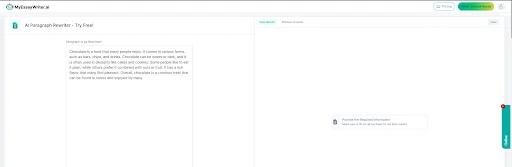
Start by entering the paragraph you want to improve. Copy and paste the paragraph into the tool’s text box. This could be from any document—an essay, article, or email.

paragraph rewriter first image

Step 2: Customize Your Output

Before rewriting, there is a section for ‘Why do you want to rewrite?’. It customizes how you'd like the tool to improve your paragraph.
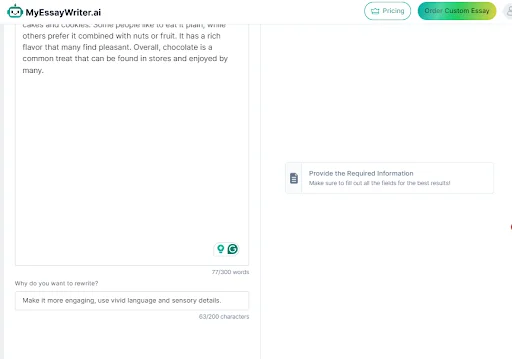
  • Select the Tone: Mention a tone that suits your writing. You can make it sound more casual, formal, or professional based on your needs.
  • Language Improvements: Decide if you want the paragraph to be simpler or more advanced.
  • Specific Preferences: If you need the tool to focus on specific areas, like word choice or sentence flow, you can mention these settings too.
paragraph rewrite second image

Step 3: Rewrite Your Paragraph

After selecting your preferences, click the ‘Rewrite’ button. In just a few seconds, the Paragraph Rewriter will generate a new version of your paragraph, improving clarity and flow without changing the meaning.

Step 4: Review the Results

Once you have your rewritten paragraph, take a moment to review it.

  • Check the Flow: Ensure that the sentences are smoother and that the tone matches your intention.
  • Adjust If Needed: If you're not fully satisfied, tweak the input or settings and rewrite it again for better results.

Step 5: Copy or Download the New Paragraph

When you're happy with the rewritten content, save it by:

  • Copying: Use the "Copy" option to quickly paste the text wherever needed.
  • Downloading: Download the revised paragraph as a file for future use.

Tips for Getting the Best Results from the Paragraph Rewriter

To get the most out of the Paragraph Rewriter, consider these tips:

  • Input Clear Sentences: Start with clear and organized paragraphs for better results.
  • Choose the Right Tone: Select a tone that fits your writing goal—formal for professional documents and casual for personal content. Try our style and tone suggestor tool to learn the tone of your content.
  • Be Specific with Customizations: Utilize customization options to specify improvements, like enhancing vocabulary or adjusting sentence length.
  • Review for Context: Check the rewritten output to ensure it fits the overall context of your piece and maintains your original intent. It is best to run it through our grammar checker.
  • Keep Your Audience in Mind: Adjust the style and complexity based on your audience, whether it’s for a school assignment, business report, or blog post.
  • Experiment with Different Versions: Try rewriting the same paragraph multiple times to explore various outputs and find the best fit for your needs.

MyEssayWriter.ai’s Paragraph Rewriter makes improving your writing fast and effortless. With just a few steps, you can turn rough paragraphs into polished, professional text. Whether you’re a student, a professional, or just someone looking to enhance your writing, this tool helps you achieve your goals with ease.

Ready to upgrade your writing? Try the Paragraph Rewriter today, and if you're working on larger projects, check out our AI Essay Writer for even more powerful writing assistance.

You've used your 1,500 free words

Keep writing without limits

Pick a plan that fits how you write.

SAVE UP TO $50.04

Starter

Best if: You write 1 to 5 essays per month

$9.99 / month
Billed monthly
  • Generate 50,000 words per month (about 30 essays)
  • Humanize 15,000 words per month
  • Unlimited AI detection checks
  • Check 10 essays for plagiarism
  • All 30+ writing tools included
  • APA, MLA, Chicago, and Harvard citations
  • Download as Word, PDF, or Google Docs
  • Save and re-edit your essays
  • Email support
7-day money-back guarantee
BEST VALUE

Unlimited

Best if: You write daily or juggle multiple classes

$24.99 / month
Billed monthly
  • Unlimited means unlimited. No caps. No gotchas.
  • Unlimited essay generation
  • Unlimited AI Humanizer
  • Unlimited AI detection
  • Unlimited plagiarism checks
  • Everything in Writer, plus:
  • Advanced research insights
  • Bulk essay generation
  • Priority chat support
  • Early access to new tools
7-day money-back guarantee

Enter the Code and Password

Code sent to your email

Edit

Didn’t get it? Resend code

Show Password

I agree to the Terms & Conditions and Privacy Policy.

Secure & encrypted verification.

Can't Recall Your Password?

Enter your registered email and we will send your password to you.

Return to Login page or Sign Up to create and account